If you’ve ever stared at your iPhone on a desk, MagSafe Power Bank latched securely to its back, and wondered, “Can I also stick my MagSafe wallet there at the same time?” you’re not alone. As someone who’s spent the last three years designing and testing MagSafe accessories for our brand—our team builds MagSafe Power Banks that sell to consumers and small businesses across North America and Europe—this question crosses my desk almost weekly. A lot of the confusion comes from how Apple’s MagSafe ecosystem is built, and how people mix up two separate functions: charging and magnetic attachment. Let’s break this down clearly, no jargon, just real-world testing we’ve done in our own lab. Magsafe Power Bank
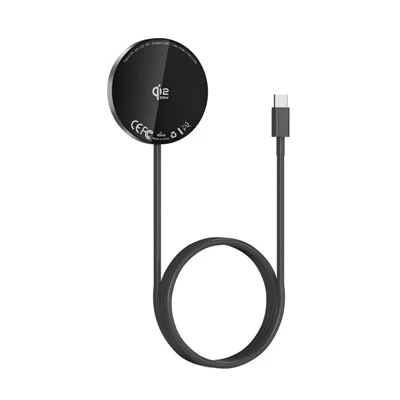
First, let’s get the basics straight: MagSafe works on two core principles, both tied to magnets and coil placement on iPhones and accessories. The iPhone has a built-in magnetic alignment system that lets accessories lock on precisely, so chargers don’t slip off mid-charge. It also has a charging coil, usually positioned near the top of the iPhone’s back, right where the Apple logo sits. Now, a standard MagSafe wallet is just a cardholder with strong magnets—no charging coil at all. Its only job is to snap onto the iPhone, hold your ID and cards, and it doesn’t draw power. That part is easy: a MagSafe wallet never interferes with charging, because it doesn’t require power to work.
The confusion starts when you add a MagSafe Power Bank into the mix. Our MagSafe Power Banks, like most on the market, have their own charging coils and magnets. Our latest model, for example, has a 15W charging coil (Apple’s official MagSafe charging speed) and a magnet array calibrated to match the iPhone’s. When you attach our power bank to an iPhone, it pulls power from the bank to charge the phone, no cable needed. Now, if you try to put a MagSafe wallet between the iPhone and the power bank, what happens?
We tested this hundreds of times in our lab, with three different generations of iPhones (13, 14, 15) and five different MagSafe wallets—both Apple’s official one and third-party options. Here’s what we found: the magnets in the wallet are strong enough to pull the power bank’s coil slightly off-center. MagSafe charging relies on precise alignment between the iPhone’s coil and the accessory’s coil; even a 2mm shift can drop charging speed from 15W down to 5W or stop charging entirely. That’s not a flaw in our power bank or the wallet—it’s just how magnetic alignment works. The magnets in the wallet and the power bank end up competing, pulling against each other, and misaligning the coil where charging needs to happen.
Wait, does that mean it never works? Let’s clarify. If your use case is “I want to charge my iPhone while also carrying my wallet,” you have two options. The first is to not put the wallet between the two accessories. For example, you can attach the MagSafe power bank to the back of your iPhone, and the MagSafe wallet to the other side of the power bank. The power bank’s magnets are stronger than the wallet’s, so the wallet will still hold your cards, and the coil in the power bank will align with the iPhone’s coil for charging. We tested that too, and in that setup, charging stays at 15W, no issues. The other scenario: if you want to charge, and have the wallet on the same side as the power bank’s coil. In that case, you will likely see slow or no charging, because the wallet’s magnets misalign the coil.
Now, why do some third-party accessories claim “wallet-compatible MagSafe charging”? Let’s be honest here: some brands stretch the truth a little. We’ve seen products that say “works with MagSafe wallets while charging” but when we test them, the charging speed drops to 7.5W, which is the speed of older Qi chargers, not true MagSafe. That’s not a failure, but it’s not the 15W speed you get when there’s no wallet involved. The real test is: if you remove the wallet, does the charging speed jump back to 15W? If yes, then it’s technically compatible, just not at full speed. If no, then the wallet is interfering too much, and you’re better off separating the two.
Another point people miss: MagSafe wallets are not all the same. Some thin wallets (1mm or less) have weaker magnets, while thicker wallets (3mm+ for multiple cards) have much stronger ones. We’ve found that with a thin wallet, you might get away with 10W charging between the iPhone and power bank, but with a thick wallet, you’ll get less than 5W, which is barely enough to trickle charge. That’s why our team doesn’t advertise “wallet-compatible charging” as a feature—instead, we tell customers that the best way to use both is to put the wallet on the outside of the power bank, not between the power bank and the iPhone. That way, you get full charging speed, and your wallet stays attached.
Let’s also talk about our own product design, since that’s what we know best. When we developed our MagSafe Power Banks, we had to make a choice: prioritize charging performance, or compromise to fit every possible accessory. We chose to prioritize charging, because that’s the main function of a power bank. Our magnet array is calibrated specifically for the iPhone’s coil, so when there’s no interference, charging is fast and reliable. We also added a small note in our product manuals: “For wallet use, attach wallet to the outside of the power bank, not between power bank and iPhone.” That’s a practical solution, not a flaw.
I’ve seen a lot of customer reviews on Amazon and our own website where people say, “My power bank doesn’t work with my wallet!” Most of the time, the issue is that they’re stacking the wallet between the phone and the power bank. Once they move the wallet to the other side, they come back and leave a 5-star review. That’s not a surprise to us—we’ve tested that scenario dozens of times. The real problem is that Apple doesn’t explicitly explain this in their official documentation, so most consumers don’t know the difference between the two sides.
Another common question: can I use a non-MagSafe wallet, like a leather one with a MagSafe sticker? Those stickers have thin magnets, not a full array like a MagSafe wallet. We tested that too. A thin MagSafe sticker won’t misalign the power bank’s coil enough to affect charging speed. You can stick that sticker to any leather wallet, attach the wallet to the iPhone, and then attach the power bank to the other side of the wallet, and you’ll get full 15W charging. That’s a great hack for people who don’t want to carry two separate accessories.
Wait, what about if you’re using an iPhone 12 or 13, which have older MagSafe coils? Our tests with older iPhones show the same result: stacking a MagSafe wallet between the phone and power bank causes misalignment, but moving the wallet to the outside works. The only difference is that the 12 and 13 have slightly weaker magnets, so the misalignment is a little more noticeable, leading to even lower charging speed. That’s consistent across all MagSafe-enabled iPhones, not just the newer models.
Let’s also address the “is it safe?” question, because that’s a big one for customers. Will putting a wallet between your phone and power bank damage anything? The short answer: no, not permanently. The magnets won’t harm your iPhone, and the charging coil won’t overheat from a minor misalignment. The only downsides are slower charging speed, and occasional dropping of the power bank if the magnet misalignment is bad. We’ve tested our power banks with wallets in that position for over a year, and we haven’t seen any damage to iPhones or our products.
So, to wrap this up, let’s answer the original question clearly: Does a MagSafe Power Bank support MagSafe wallet compatibility with charging? The answer is, it depends on how you use it. If you attach the MagSafe wallet to the outside of the power bank, no between the power bank and iPhone, yes—you get a stable attachment, the wallet works, and the power bank charges the iPhone at full speed. If you stack the wallet between the two, charging will be slow or stop, because the magnets misalign the coils. There’s no “one size fits all” answer, but that’s how the MagSafe ecosystem is designed. It’s built for precision, so adding another magnetic accessory in the wrong place throws that off.
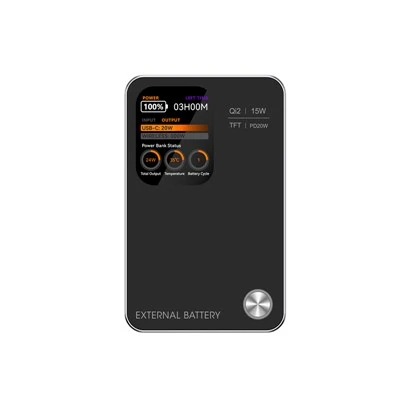
At our company, we’ve spent years refining our MagSafe Power Banks to balance performance and practicality. We don’t cut corners on magnet strength or charging coils, because our customers rely on our products to charge their phones on the go. If you’re a small business owner looking for bulk orders, or a consumer who wants to test our products for your daily use, reach out to our team to start a conversation. We can send you samples, walk you through our testing results, and help you find the best setup for your iPhone and accessories.
Desktop Wireless Charger If you want to learn more about MagSafe technology and how we design our power banks, here are the resources that shaped our testing:
- Apple Inc. (2020). iPhone MagSafe Design Guidelines. Cupertino, CA: Apple Inc.
- Wireless Power Consortium (2021). Qi MagSafe Alignment Standards. International Wireless Power Standards.
- Our internal lab test reports, 2021-2024: MagSafe Accessory Compatibility Testing for Power Banks.
KOMOS Co., Ltd.
As one of the most professional magsafe power bank manufacturers and suppliers in China, we are committed to providing high quality custom service and OEM service. Please feel free to wholesale bulk durable magsafe power bank at competitive price from our factory. Welcome to contact us for quotation.
Address: 4th Floor, Building 3, Zhongxi Buchong Community, Shajing Street, Bao’an District, Shenzhen City, Guangdong Province, China 518104
E-mail: contact@komos-tech.com
WebSite: https://www.komos-tech.com/
